


At ISEO, we know that the world of cloud-based access control and smart lock ecosystems is moving fast. As our solutions become more customizable and feature-rich, configuring the perfect system shouldn’t mean getting bogged down in complex spreadsheets and compatibility cross-checks.
We want to make your life simpler, speed up your pre-sales workflow, and streamline how you design and communicate solutions with us. That is why we are thrilled to introduce a brand-new suite of integrated digital tools developed specifically for our network of dealers, distributors, Value-Added Resellers (VARs), and system integrators.
This modern digital ecosystem completely replaces the legacy «Training & Resources» section on Vasho, upgrading your workspace into a sleek, centralized control center.
In the new interface, the dashboard is cleanly split into specialized Apps to build your projects and quick-access Resources to support your business.
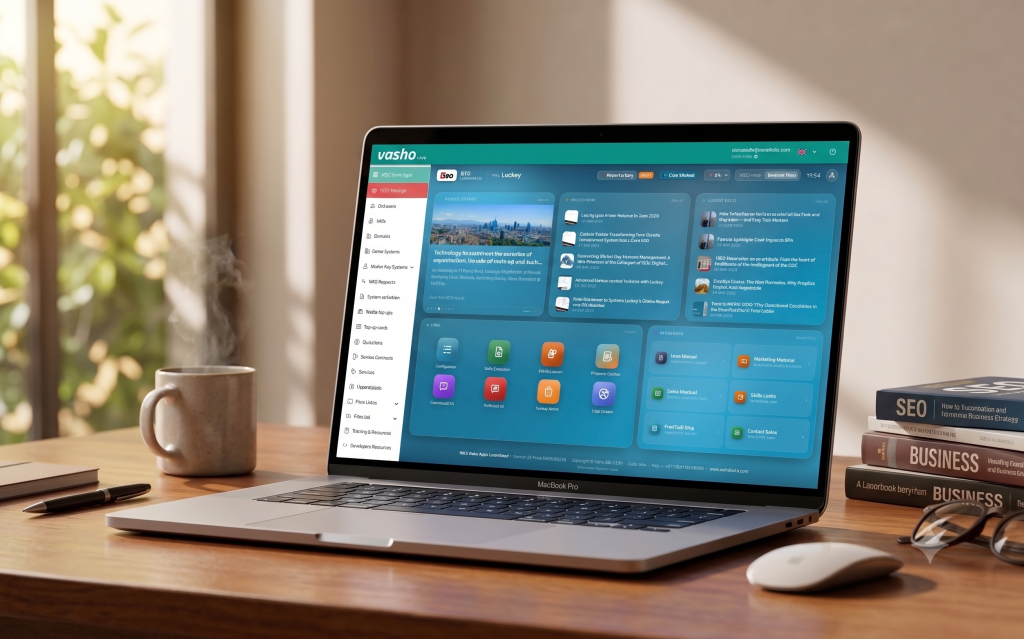
What’s Inside the New Digital Workspace?
The new suite consists of four core interconnected applications designed to take you from a rough customer use case to a flawless, installation-ready commercial proposal in record time.
1. The Configurator: Use-Case Driven Design
Every great project starts with understanding the client’s true intent. Instead of starting from product codes, the Configurator asks one fundamental question: What is your customer’s use case?
- Tailored Guidance: Optimized for 19 distinct use cases across 5 major segments (including Offices, Residential, and Retail).
- Smart Filtering: By answering 10 straightforward project questions (covering requirements like remote door opening, real-time logging, or API needs), the app automatically recommends the ideal subscription model and firmware configuration.
- Instant Storytelling: It automatically generates use-case-specific sales copy describing features and add-ons that you can immediately pull into your client presentations.
2. SaaS Quotation Tool: Beyond the Spreadsheet
Say goodbye to detached Excel quotation files and version control headaches.
- Input your door and user counts, and the tool immediately calculates the proper subscription tier.
- It dynamically filters and displays only the add-ons and plugins that are perfectly compatible with your project configuration.
- Fully supports multiple currencies and automatically handles complex cascade discount structures.
3. Hardware Quotation Tool: Technical Design Made Simple
This tool introduces over 12 features to help you build a complete Bill of Materials (BOM) without missing critical installation details. While a basic «quotation-only» mode is available, we highly recommend utilizing the Quotation + Technical Design framework:
- Hardware Finder: Walk through 7 intuitive questions to pin down the exact hardware combination required for any specific door type.
- Automated Logic & Electrical Schematics: As you build your door schedule, the application automatically maps out your system layout, gateway connections, and wiring diagrams. You can export these technical schematics directly to handover to installation teams or include them in formal tenders.
- Smart Engineering: The tool automatically calculates your project’s Power Budget (specifying exactly how many power supplies are needed for complex multi-lock Atlas configurations) and appends mandatory accessories like MasterCards or battery-changing tools.
- Specialized Wizards: Dedicated walkthroughs allow you to effortlessly configure access control for elevators (floor selection or calling) and turnstiles/speed gates with a few clicks.
4. The Proposal Creator: Zero-Error Proposals
The Proposal Creator pulls your value proposition text, SaaS quotes, and hardware designs together into one beautifully formatted, client-ready PDF or Word document.
- Automated Consistency Checks: Before exporting, the app runs over 15 automated validation rules across your entire project. It will catch and flag technical mismatches before your customer ever sees them (e.g., warning you if you have accidentally coupled a basic software tier with advanced hardware features, or added a virtual intercom feature without its corresponding hardware tile).
Streamlining Communication with ISEO
This suite is a massive step forward for our shared value chain. By moving away from manual designs and disconnected files, your technical and commercial layouts arrive at our Solution Center and Back Office fully validated and perfectly formatted.
The Result? Drastically reduced processing times, fewer order queries, zero hardware-software friction, and faster deliveries for your end customers.
Ready to Get Started?
The new workspace is live, fully localized in multiple languages, and packed with comprehensive online manuals built right into each tool to guide you step-by-step.
- Head over to https://vasho.sofialocks.cloud
- Log in with your existing credentials to explore your brand-new dashboard layout (don’t have credentials? require access)
- Don’t have an account yet? Simply click «Request Access» on the login page, submit your professional details, and our team will activate your profile.
- If you run into any questions or spot something unexpected while exploring, use the integrated «Report a Bug» feature to securely send diagnostic context straight to our development team.
Explore the tools today, accelerate your quotation workflows, and let’s win more projects together!